
spats.lib
Spatialization (Spats) library. Its official prefix is sp.
This library provides spatialization in Faust: stereo and multichannel amplitude panning, wave field synthesis and binaural rendering.
The Spats library is organized into 5 sections:
References
Stereo Panning
Placing a mono source, or balancing a stereo pair, between two loudspeakers
by amplitude: with a linear law (panner) or a constant-power law
(constantPowerPan).
(sp.)panner
A simple linear stereo panner.
panner is a standard Faust function.
Usage
_ : panner(g) : _,_
Where:
g: the panning (0-1): 0 sends the input to the left (first) output, 1 to the right one; the gains are1-gandg(each -6 dB at 0.5)
Test
sp = library("spats.lib");
os = library("oscillators.lib");
panner_test = os.tosc(220) : sp.panner(hslider("panner:pan", 0.3, 0, 1, 0.01));
(sp.)constantPowerPan
Apply constant-power panning to a stereo signal. Each input channel's gain is adjusted according to the pan position using a cosine/sine law: the left input is scaled by cos(θ)/√2 and the right input by sin(θ)/√2, where θ = π·p/2.
Normalization
A standard constant-power pan uses bare cos/sin gains, which peak at unity (0 dB) when hard-panned and dip to 1/√2 (−3 dB) at center. This implementation divides by √2, halving all gains:
p = 0: left = 1/√2 ≈ 0.707 (−3 dB), right = 0p = 0.5: left = 0.5 (−6 dB), right = 0.5 (−6 dB)p = 1: left = 0, right = 1/√2 ≈ 0.707 (−3 dB)
The /√2 factor makes the panner mono-safe: if the two output channels are ever summed to mono, the worst case is center pan, where the mono signal becomes 0.5x + 0.5y. Without the normalization, center pan would produce ≈ 0.707x + 0.707y, which can clip with correlated or in-phase material. More generally, the normalization guarantees that the sum of the two gains never exceeds unity for any pan position:
gainLeft + gainRight = (cos θ + sin θ) / √2 ≤ 1
This holds because cos θ + sin θ has a maximum of √2 (at θ = π/4), and √2/√2 = 1. The total power is also constant at 0.5 for all pan positions.
Usage
_,_ : constantPowerPan(p) : _,_
Where:
p: the panning (0-1)
Test
sp = library("spats.lib");
os = library("oscillators.lib");
constantPowerPan_test = (os.tosc(110), os.tosc(220))
  : sp.constantPowerPan(hslider("constantPowerPan:pan", 0.4, 0, 1, 0.01));
Multichannel Amplitude Panning
Distributing a mono source over N loudspeakers by amplitude, from its
direction: spat for loudspeakers evenly spaced on a circle, with a source
distance, and spcap for an arbitrary 2D layout, with a correction for the
speaker density.
(sp.)spat
GMEM SPAT: n-outputs spatializer.
spat is a standard Faust function.
Usage
_ : spat(N,r,d) : si.bus(N)
Where:
N: number of outputs (a constant numerical expression)r: rotation (between 0 et 1)d: distance of the source (between 0 et 1)
Test
sp = library("spats.lib");
os = library("oscillators.lib");
spat_test = os.tosc(330)
  : sp.spat(4,
      hslider("spat:rotation", 0.25, 0, 1, 0.01),
      hslider("spat:distance", 0.5, 0, 1, 0.01));
(sp.)spcap
Speaker-Placement Correction Amplitude Panning (SPCAP).
SPCAP calculates panning gains for an arbitrary 2D loudspeaker layout by computing the angular distance between the virtual source and each speaker, and correcting for "speaker density" (groupings of speakers that would otherwise cause a volume imbalance).
Important note on physical distance: this algorithm only handles spatial distribution based on azimuth angles. It does not compensate for volume drops or acoustic delays caused by uneven physical distances of the speakers from the listener. In a complete DSP chain, distance correction must be applied downstream from this algorithm, individually per channel, using a delay line for time alignment and a static gain trim to equalize acoustic pressure.
Usage
_ : spcap(N, alpha, th, theta_s) : si.bus(N)
Where:
N: number of speakers (a constant numerical expression)alpha: panning sharpness/width (float signal, typical range 1.0 to 10.0)th: a functionth(i)returning the physical azimuth angle of speakeriin radianstheta_s: virtual source azimuth angle in radians (float signal)
Test
sp = library("spats.lib");
ma = library("maths.lib");
os = library("oscillators.lib");
spcap_spk_deg(0) = -135;
spcap_spk_deg(1) = -45;
spcap_spk_deg(2) = 45;
spcap_spk_deg(3) = 135;
spcap_spk_angle(i) = spcap_spk_deg(i) : ma.deg2rad;
spcap_test = os.tosc(440) : sp.spcap(4, 2.0, spcap_spk_angle, 0.0);
References
- Ramy Sadek and Chris Kyriakakis, "A Novel Multichannel Panning Method for Standard and Arbitrary Loudspeaker Configurations", 2004. (DTIC Reference: ADA464895)
- https://apps.dtic.mil/sti/tr/pdf/ADA464895.pdf
(sp.)spcap_ui
Speaker-Placement Correction Amplitude Panning with a built-in UI.
This is a convenience wrapper around spcap for interactive control of the
virtual source azimuth, the panning sharpness, and the physical azimuth of
each loudspeaker.
UI controls: SPCAP/pan_sharpness is the panning sharpness parameter
alpha (higher values make the virtual source more focused around the
closest speakers); SPCAP/source_angle is the virtual source azimuth in
degrees, converted to radians before calling spcap;
SPCAP/Speaker%2i/angle is the physical azimuth of speaker i in degrees
(the default layout is a regular circular distribution centered in each
speaker sector, and can be edited from the UI).
Use spcap directly when the source angle, speaker angles, or sharpness
parameter must be supplied by an existing DSP expression instead of UI
controls.
Usage
_ : spcap_ui(N) : si.bus(N)
Where:
N: number of speakers (a constant numerical expression). The function has one input signal and producesNoutput signals, one per speaker
Test
sp = library("spats.lib");
os = library("oscillators.lib");
spcap_ui_test = os.tosc(440) : sp.spcap_ui(4);
Example test program
import("stdfaust.lib");

process = os.osc(440) : sp.spcap_ui(8);
Wave Field Synthesis
Reconstructing the wave field of several sources over a linear loudspeaker array: each loudspeaker plays every source delayed and attenuated according to its distance from the source.
(sp.)wfs
Wave Field Synthesis algorithm for multiple sound sources. Implementation generalized starting from Pierre Lecomte version.
Usage
wfs(xref, yref, zref, speakersDist, nSources, nSpeakers, inProc, xs, ys, zs) : si.bus(nSpeakers)
Where:
xref: x-coordinate of the reference listening point in metersyref: y-coordinate of the reference listening point in meterszref: z-coordinate of the reference listening point in metersspeakersDist: distance between speakers in meters (a constant numerical expression)nSources: number of sound sources (a constant numerical expression)nSpeakers: number of speakers (a constant numerical expression)inProc: per-source processor function, as a function of the source indexxs: x-coordinate of the sound source in meters, as a function of the source indexys: y-coordinate of the sound source in meters, as a function of the source indexzs: z-coordinate of the sound source in meters, as a function of the source index
Test
sp = library("spats.lib");
os = library("oscillators.lib");
ba = library("basics.lib");
ma = library("maths.lib");
wfs_proc(i) = *(0.5); // Simple gain processor
wfs_xs(i) = 0.0;
wfs_ys(i) = 1.0;
wfs_zs(i) = 0.0;
wfs_test = os.tosc(440)
  : sp.wfs(0, 1, 0, 0.5, 1, 2, wfs_proc, wfs_xs, wfs_ys, wfs_zs);
wfs_modulated_test = os.tosc(440) : sp.wfs(0, 1, 0, 0.5, 1, 2, proc, xs, ys, zs) with { proc(i) = *(0.5); xs(i) = 2*tri - 1; ys(i) = 1.0; zs(i) = 0.0; P = int(ma.SR/10); tri = 1 - abs(2*ba.period(P)/P - 1); };
(sp.)wfs_ui
Wave Field Synthesis algorithm for multiple sound sources with a built-in UI.
Usage
wfs_ui(xref, yref, zref, speakersDist, nSources, nSpeakers) : si.bus(nSpeakers)
Where:
xref: x-coordinate of the reference listening point in metersyref: y-coordinate of the reference listening point in meterszref: z-coordinate of the reference listening point in metersspeakersDist: distance between speakers in metersnSources: number of sound sources (a constant numerical expression)nSpeakers: number of speakers (a constant numerical expression)
Test
sp = library("spats.lib");
os = library("oscillators.lib");
wfs_ui_test = os.tosc(550)
  : sp.wfs_ui(0, 1, 0, 0.5, 1, 2);
Example test program
// Distance between speakers in meters
speakersDist = 0.0783;

// Reference listening point (central position for WFS)
xref = 0;
yref = 1;
zref = 0;

Spatialize 4 sound sources on 16 speakers
process = wfs_ui(xref,yref,zref,speakersDist,4,16);
Binaural Rendering
Rendering a mono source for headphones as the two signals that reach the
ears: from a parametric head model (binauralModel) or from measured head
related impulse responses (binauralFir).
(sp.)binauralModel
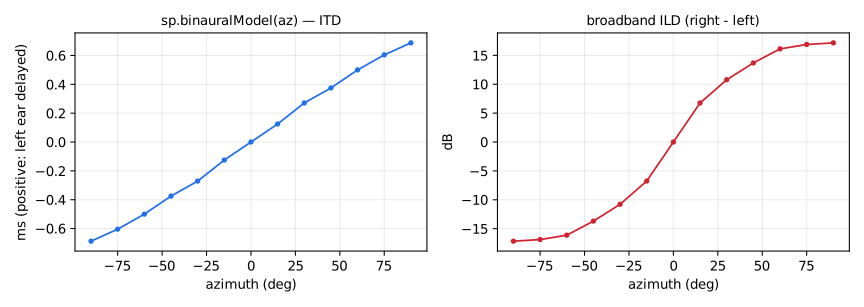
Parametric (structural) binaural spatializer after Brown and Duda: a mono
source is placed at a given azimuth using the two dominant localization
cues. The interaural time difference follows the Woodworth spherical-head
formula (radius 8.75 cm, applied as a fractional delay on the far ear),
and the interaural level difference is a one-pole/one-zero head-shadow
filter per ear whose high-frequency response varies continuously from
+6 dB (source side) to shadowed (opposite side), corner around 1.2 kHz.
No elevation cues and no pinna model: for full localization use measured
HRIRs with sp.binauralFir.
Usage
_ : binauralModel(az) : _,_ // left, right
Where:
az: azimuth in degrees, 0 in front, positive towards the RIGHT ear, any value (wrapped internally to [-180, 180])
Test
sp = library("spats.lib");
os = library("oscillators.lib");
ba = library("basics.lib");
ma = library("maths.lib");
binauralModel_test = os.tosc(440) : sp.binauralModel(45);
binauralModel_modulated_test = os.tosc(440) : sp.binauralModel(180*tri - 90) with { P = int(ma.SR/10); tri = 1 - abs(2*ba.period(P)/P - 1); };
binauralModel_jump_test = os.tosc(440) : sp.binauralModel(180*sq - 90) with { P = int(ma.SR/10); sq = ba.period(2*P) < P; };
References
- C.P. Brown and R.O. Duda, "A structural model for binaural sound synthesis", IEEE Trans. Speech and Audio Processing, 6(5), 1998.
- https://ccrma.stanford.edu/~jos/pasp/Spherical_Head_Model.html
(sp.)binauralFir
Binaural rendering by direct convolution with a measured pair of head related impulse responses. Measured HRIRs are short (128-256 taps at 44.1/48 kHz), so a direct FIR is perfectly affordable and no partitioned convolution is needed: pass the taps of the left-ear and right-ear HRIRs for the desired direction as two constant lists.
Usage
_ : binauralFir(hL, hR) : _,_ // left, right
Where:
hL: left-ear HRIR taps, a list(l0, l1, ...)of constant numerical expressionshR: right-ear HRIR taps, a list(r0, r1, ...)of constant numerical expressions
Example
_ : binauralFir((0.9, 0.05, 0.02), (0.4, 0.3, 0.1)) : _,_
Test
sp = library("spats.lib");
os = library("oscillators.lib");
binauralFir_test = os.tosc(440) : sp.binauralFir((0.9, 0.05, 0.02), (0.4, 0.3, 0.1));
Utilities
Adapting processors to a stereo signal chain.
(sp.)stereoize
Transform an arbitrary processor p into a stereo processor with 2 inputs
and 2 outputs.
Usage
_,_ : stereoize(p) : _,_
Where:
p: the arbitrary processor
Test
sp = library("spats.lib");
os = library("oscillators.lib");
stereoize_test = (os.tosc(660), os.tosc(770))
  : sp.stereoize(+);